The Lead Time Management feature helps users plan material ordering based on the time required before the material is needed for the schedule.
Lead time can be added while creating or editing material items in the Cost Catalog or while managing material plans in the schedule planner.
What is Lead Time?
Lead time refers to the number of calendar days required before a material should be ordered or made available for project execution.
For example, if a material has a lead time of 5 days, the system helps identify that the material should be ordered 5 days before the schedule start date.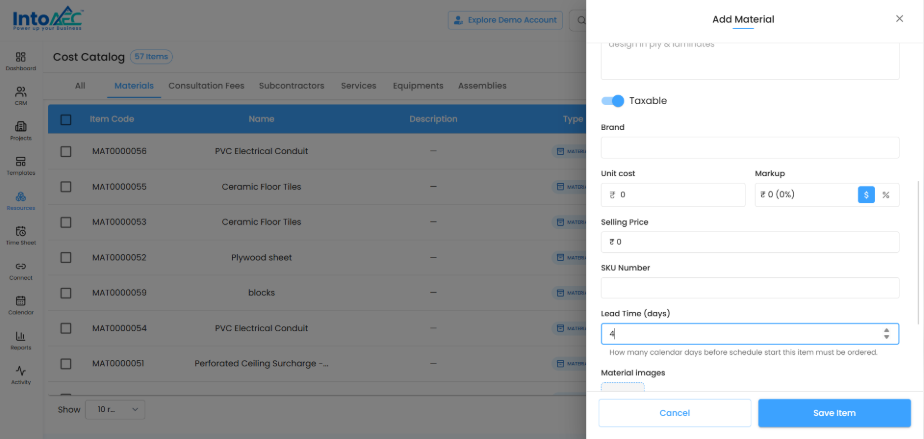
Adding Lead Time in Cost Catalog
Users can add lead time while creating or editing a material in the Cost Catalog.
The material form includes the Lead Time (days) field. Users can enter the number of days required before the item should be ordered.
This helps standardize lead time for commonly used materials.
Editing Lead Time in Material Plan
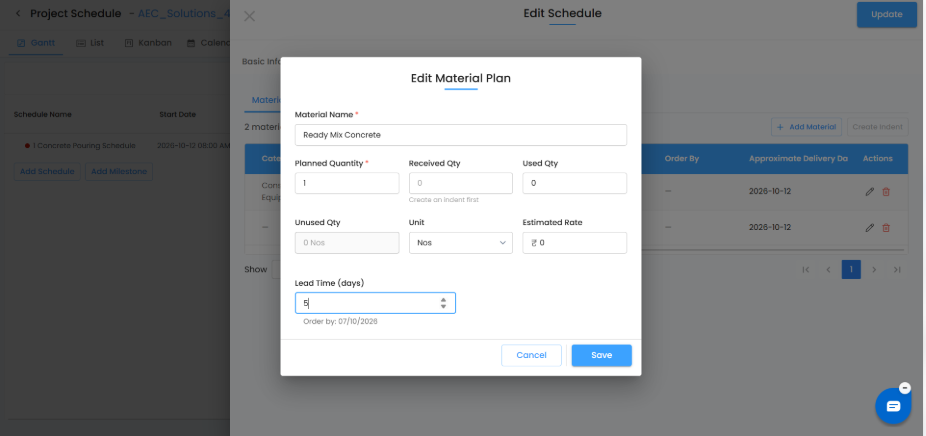
Users can also update lead time while editing a material plan inside the schedule planner.
When lead time is entered, the system displays the Order By date based on the schedule start date and the selected lead time.
Material Plan View
After saving the material plan, the schedule planner shows:
Planned quantity
Received quantity
Used quantity
Unused quantity
Order By date
Approximate delivery date
Lead time details
This gives project teams clear visibility on when materials need to be ordered and when they are expected to arrive.
Benefits
Lead Time Management helps users:
Plan material ordering in advance
Avoid project delays due to late procurement
Track order-by dates clearly
Improve coordination between schedule and procurement teams
Manage material availability based on project timelines
Summary
Lead Time Management helps teams plan procurement more accurately by connecting material planning with schedule dates. By adding lead time, users can identify when materials should be ordered and avoid last-minute delays.
Was this article helpful?
That’s Great!
Thank you for your feedback
Sorry! We couldn't be helpful
Thank you for your feedback
Feedback sent
We appreciate your effort and will try to fix the article