Overview
The List View presents all schedules in a structured table, making it easy to review key details, edit schedules, and monitor progress. Unlike the Gantt View's timeline, it focuses on detail and data management.
Before you begin: Open the project, click the Schedule tab, and switch to List View.
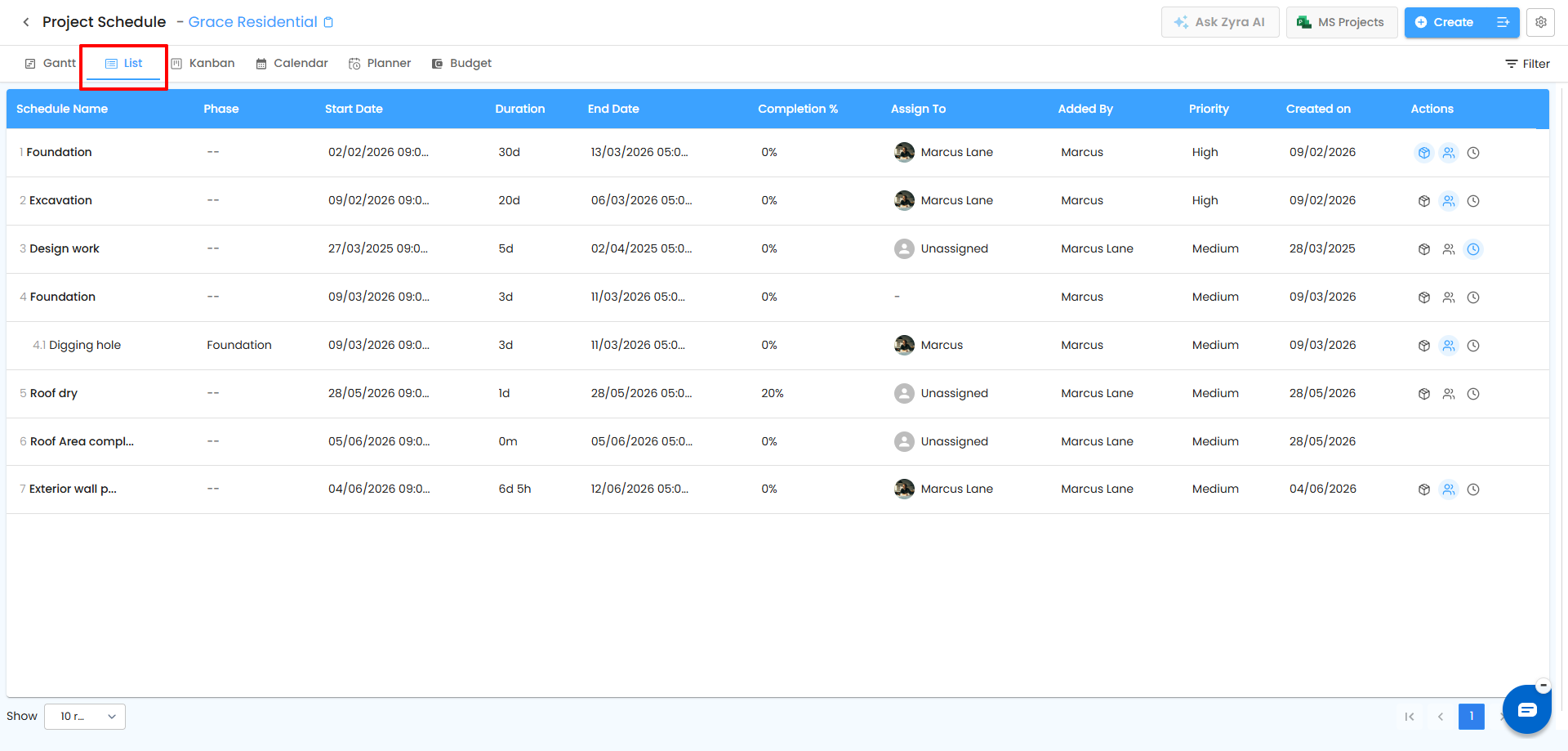
Columns in the List View
| Column | Description |
|---|---|
| Schedule Name | Title of the schedule. |
| Phase | The project phase it belongs to, if any. |
| Start Date | When the schedule begins. |
| Duration | Total days allocated. |
| End Date | Calculated from start date and duration. |
| Completion % | Progress of the schedule. |
| Assign To | The responsible user, or Unassigned. |
| Added By | The user who created the schedule. |
| Created On | The date it was created. |
| Priority | High, Medium, or Low. |
| Action | Icons for Material Planner, Resource Planner, and Timesheet. An icon is highlighted when the schedule has that information. Not available for milestones. |
Pro Tip: Sort or filter by priority, completion, or assigned user to quickly find overdue schedules and manage many schedules efficiently.
Actions Available
| Action | What it does |
|---|---|
| Edit | Change name, dates, assignee, priority, and other details. |
| Pause | Temporarily stop a schedule without deleting it. |
| Resume | Return a paused schedule to active so progress tracking continues. |
| Complete | Mark the schedule completed and set progress to 100%. |
| Delete | Permanently remove the schedule. |
How Parent Task Progress Is Calculated
A parent task's progress updates automatically from its child tasks. Each completed child contributes equally, based on the total number of children.
| Child tasks | Completed | Parent progress |
|---|---|---|
| 2 | 1 | 50% |
| 3 | 1 | 33% |
As more children are completed, the parent percentage updates automatically.
Best Practices
- Use Complete and Pause to keep the list accurate and free of outdated items.
- Update statuses regularly and use sorting or filtering to spot high-priority or overdue work.
Related Articles
- Gantt View
- How to Create a Schedule
- Schedule Planner – Plan Materials, Resources, Quantities, and Assets
Need Further Assistance?
Contact your organization administrator or the IntoAEC support team.
Was this article helpful?
That’s Great!
Thank you for your feedback
Sorry! We couldn't be helpful
Thank you for your feedback
Feedback sent
We appreciate your effort and will try to fix the article