Assets Report – Complete Visibility of Your Project Assets
The Assets Report gives you a centralized view of all assets across projects, helping you track availability, usage, ownership, and location in one structured, exportable view. It ensures better control over assets and reduces mismanagement on-site.
What You Can Do Here
View All Assets – Track every asset along with its status and location.
Monitor Availability – Instantly see which assets are available or currently in use.
Filter & Export Data – Narrow down assets using filters and export selected data for reporting or audits.
How to Access Assets Report
Go to Reports from the main menu.
Select Assets Report to open the detailed assets dashboard.
Pro Tip: Regularly reviewing assets reports helps prevent asset misplacement, over-renting, and underutilization.
Using Filters to Refine Assets Data
Filters help you quickly focus on the assets that matter most, making asset tracking more efficient and organized.
What You Can Do Here
Status Filter – Filter assets based on:
In Use
Available
Asset Type – Filter by:
Individual
Bulk
Ownership Type – Filter by:
Owned
Rented
Apply Filters – Click Apply to update the assets list based on selected filters.
Clear Filters – Click Clear to remove all filters and view all assets.
Pro Tip: Use multiple filters together to quickly identify available owned assets or assets currently in use at specific locations.
Assets Dashboard – Overview
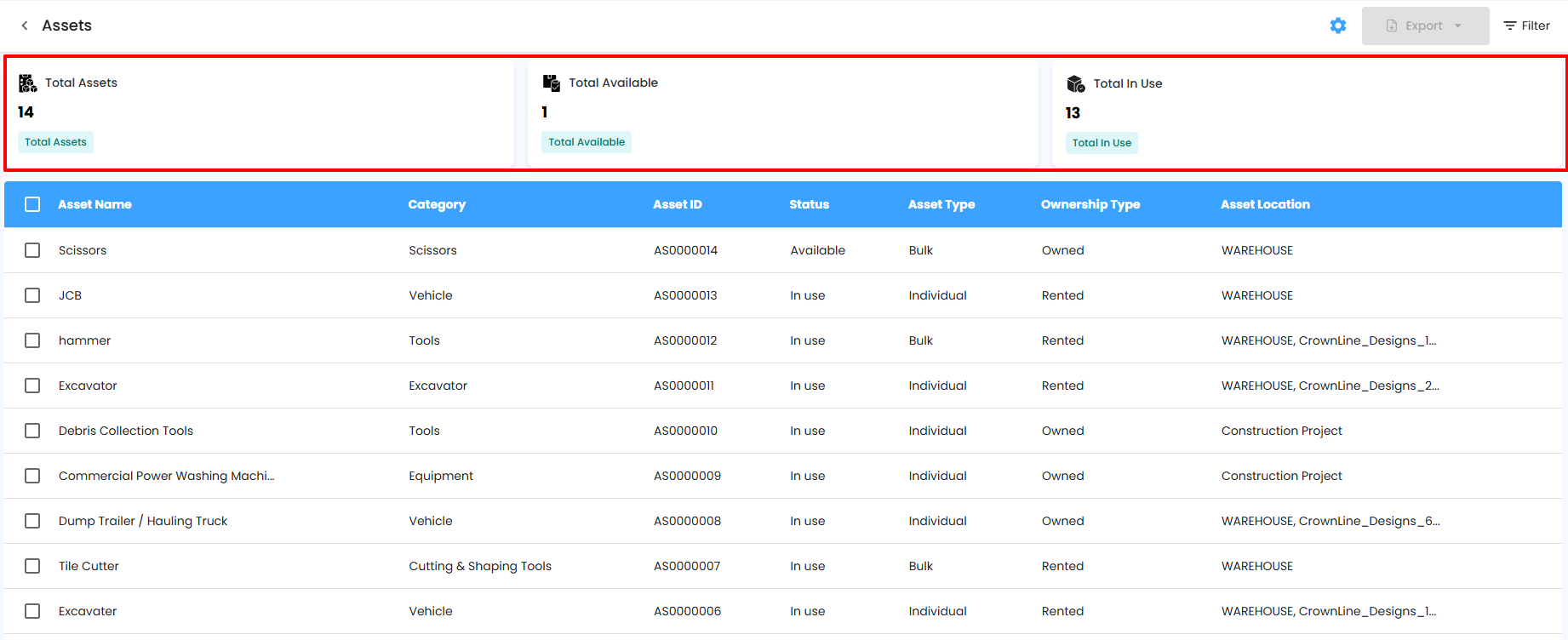
The dashboard cards provide a quick summary of asset status across your organization.
What You Can Do Here
Total Assets – Shows the total number of assets available in the system.
Total Available – Displays how many assets are currently available for use.
Total In Use – Indicates how many assets are actively in use across projects.
Pro Tip: Use these cards to quickly assess asset utilization and identify shortages or idle assets.
Assets Report Table – Detailed View
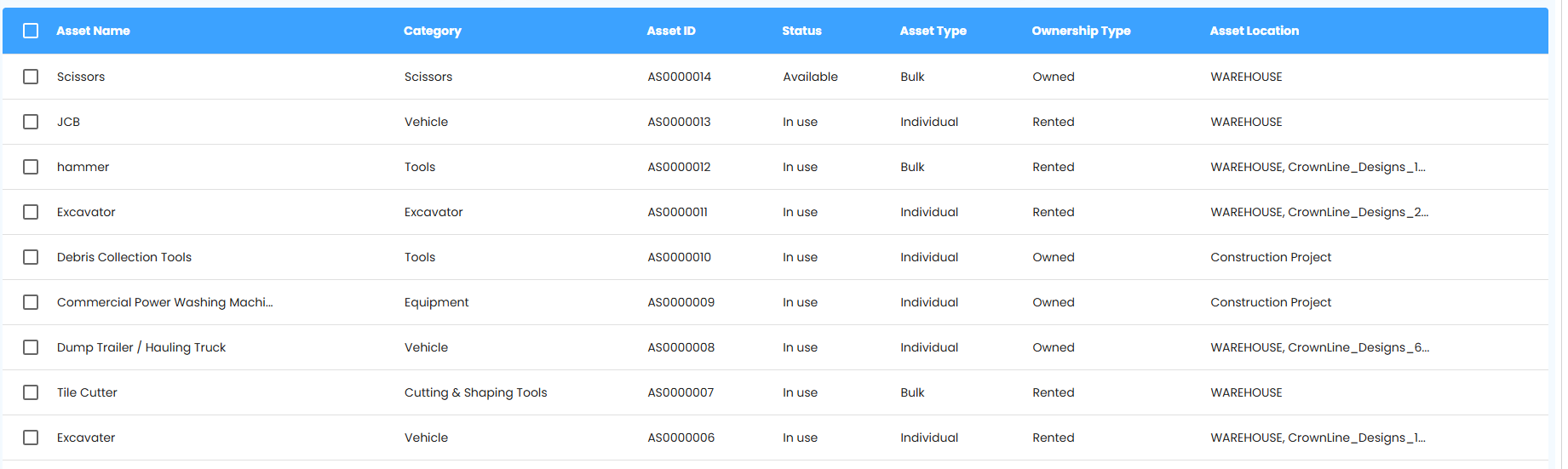
The table provides a detailed breakdown of each asset, helping you track ownership, usage, and location accurately.
What You Can Do Here
Asset Name – View the name of the asset.
Category – Identify the asset category for easy classification.
Asset ID – Track assets using their unique identification number.
Status – Check whether the asset is available or in use.
Asset Type – See whether the asset is individual or bulk.
Ownership Type – Identify if the asset is owned or rented.
Asset Location – Track where the asset is currently located.
Pro Tip: Use the table to quickly locate assets, verify ownership, and monitor usage across projects.
Bulk Actions & Exporting Assets Data
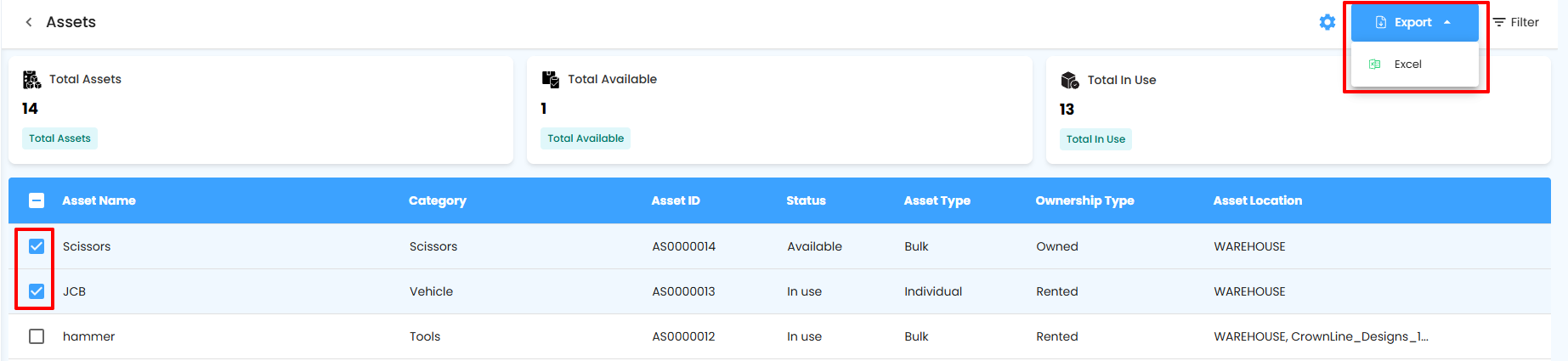
Manage multiple asset records efficiently and export them for offline use.
What You Can Do Here
Bulk Selection – Select multiple assets using the checkboxes on the left.
Export Button – Once assets are selected, the export button becomes active.
Export to Excel – Click the export dropdown and select Excel to download the selected asset details.
Pro Tip: Use bulk export to simplify audits, asset verification, and internal reporting.
Why Use Assets Reports
Assets reports help you maintain control, visibility, and accountability for all your assets.
What You Can Do Here
Maintain accurate records of all assets.
Track availability and usage in real time.
Reduce asset loss, duplication, and unnecessary rentals.
Export data for audits, reporting, and internal reviews.
Pro Tip: Reviewing assets reports regularly ensures better asset planning and improves overall operational efficiency.
Was this article helpful?
That’s Great!
Thank you for your feedback
Sorry! We couldn't be helpful
Thank you for your feedback
Feedback sent
We appreciate your effort and will try to fix the article