The Individual Project Dashboard gives users a clear project-wise overview inside IntoAEC. It helps users view important project details, track project progress, monitor key activities, and access all project-related modules from one place.
The updated Side Menu is designed to make navigation easier by grouping project modules into clear sections such as Plan & Design, Finance, Procurement, Execution, Onsite, and Others.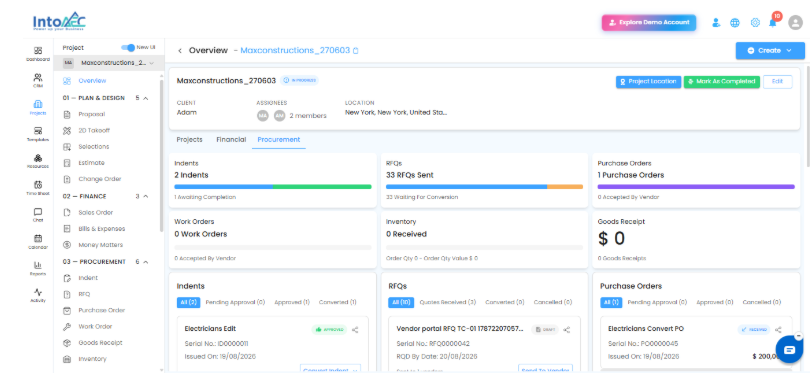
Individual Project Dashboard
The Individual Project Dashboard provides a centralized view of a selected project. Users can quickly check the project status, project information, activity summaries, insights, and important project metrics without opening each module separately.
From this dashboard, users can monitor the project’s overall progress and take quick action when required.
Project Information Section
At the top of the dashboard, users can view the basic project details, such as:
| Field | Description |
|---|---|
| Project Name | Displays the selected project name |
| Status | Shows the current project status |
| Client | Displays the client linked to the project |
| Reporter | Shows the project reporter |
| Assignees | Displays the assigned team members |
| Location | Shows the project location if available |
Users can also access quick actions such as Project Location, Mark As Completed, and Edit from this section.
Project Dashboard Tabs
The dashboard is organized into different tabs to make project tracking easier.
| Tab | Description |
|---|---|
| Projects | Shows project progress, tasks, schedules, time logged, insights, and execution-related summaries |
| Financial | Displays finance-related project information |
| Procurement | Shows procurement-related summaries such as Indents, RFQs, Purchase Orders, Work Orders, Inventory, and Goods Receipt |
Project Summary Cards
The dashboard includes summary cards that provide a quick view of the project status.
Users can view details such as:
Project Health
Tasks
Schedules
Total Time Logged
These cards help users quickly identify pending, overdue, delayed, or completed project activities.
Project Insights
The Project Insights section provides important project-level observations and summaries.
For example, the dashboard can show alerts related to overdue tasks, delayed schedules, escalated issues, or project slippage. This helps users understand where attention is required and take action on time.
Side Menu Modification
The updated side menu provides a more structured way to access project modules. Instead of listing all modules together, the modules are grouped based on their purpose.
This makes it easier for users to navigate to the required feature quickly.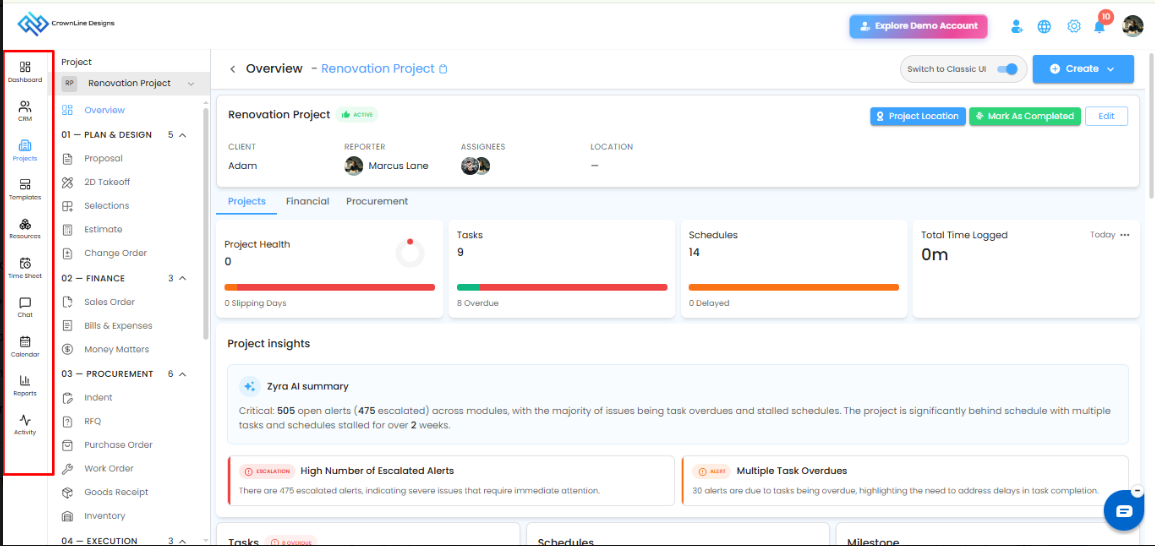
Side Menu Sections
The project side menu is organized into the following sections:
Plan & Design
This section includes modules used during the planning and design stage of the project.
Examples:
Proposal
2D Takeoff
Selections
Estimate
Change Order
Finance
This section includes finance-related modules for managing project billing and payments.
Examples:
Sales Order
Bills & Expenses
Money Matters
Procurement
This section includes procurement-related modules used for vendor and material workflows.
Examples:
Indent
RFQ
Purchase Order
Work Order
Goods Receipt
Inventory
Execution
This section includes modules used to manage execution activities.
Examples:
Schedule
Task
Budgeting
Onsite
This section includes onsite activity tracking modules.
Examples:
Time Tracking
Daily Report
Workers
Assets
Others
This section includes communication and document-related modules.
Examples:
Client Report
Document
Event
Communication
Forms
Call Log
Benefits of the Updated Dashboard and Side Menu
The new Individual Project Dashboard and side menu help users:
View project details from one place
Track project health and progress easily
Access tasks, schedules, milestones, and time tracking quickly
Monitor procurement and financial activities
Navigate project modules in a more organized way
Reduce time spent switching between different pages
Improve project visibility and daily tracking
Summary
The Individual Project Dashboard gives users a centralized view of each project, including project details, task progress, schedule status, time logged, insights, and forecast information. The updated side menu improves navigation by grouping modules into clear sections, helping users access project features faster and manage project work more efficiently.
Was this article helpful?
That’s Great!
Thank you for your feedback
Sorry! We couldn't be helpful
Thank you for your feedback
Feedback sent
We appreciate your effort and will try to fix the article