Overview
The Create Estimate with AI feature in IntoAEC allows you to generate a complete, structured project estimate using simple natural language. Instead of manually creating line items, Zyra AI understands your project requirements, asks clarifying questions, and automatically builds an itemized estimate with sections, quantities, and unit rates. All generated items remain fully editable, and Zyra AI continues to assist you at both the estimate and individual item level.
What is Zyra AI?
Zyra AI is IntoAEC’s built-in AI assistant designed to simplify estimation. It helps you:
- Generate estimates conversationally
- Perform rate analysis
- Suggest alternative materials or specifications
- Provide budget-friendly options
- Answer item-specific queries instantly
Create a new Estimate
Step 1: Open a New Estimate
- Go to Clients / Projects from the sidebar
- Open the required project
- Navigate to the Estimates tab
- Click Create Estimate
A blank estimate will open with an Ask Zyra AI option available.
Step 2: Start Zyra AI
- Click Ask Zyra AI in the Items section
- A chat panel will open
- Enter your project description (example: “Create a rough interior estimate for a 3BHK house”)
- Click Ask Zyra
Writing a Good Prompt
For better results, include:
- Project type (interior, civil, MEP)
- Area or size
- Finish level (basic, mid-range, premium)
- Inclusions/exclusions
Example:
“Create a rough interior estimate for a 2,400 sq ft 3BHK with premium finishes, fixed interiors only.”
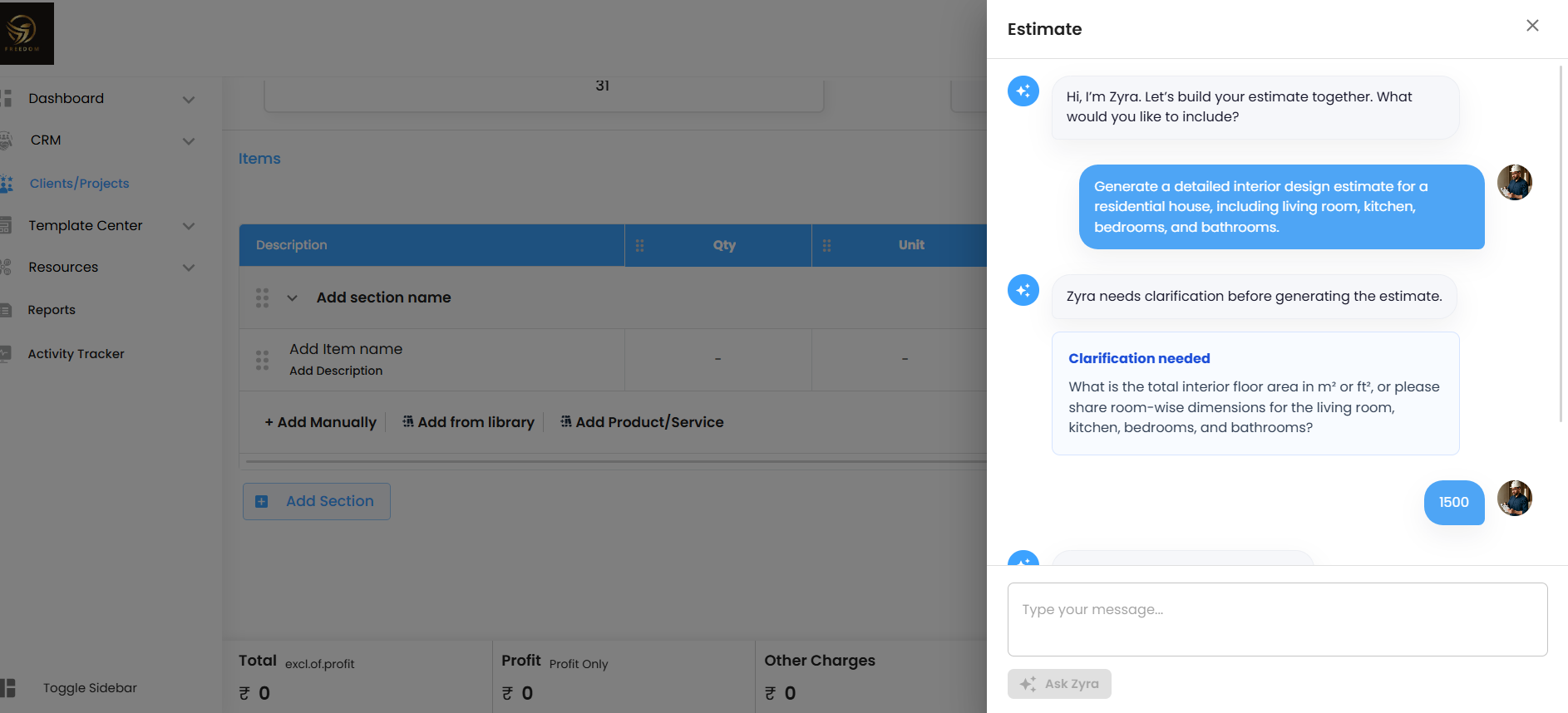
Step 3: Answer Clarification Questions
Zyra AI may ask questions to refine the estimate:
- Finish level
- Scope (fixed interiors, furniture, appliances, etc.)
Provide answers until Zyra confirms completion. During this process, a Thinking Panel may appear showing how Zyra is analysing your input.
Step 4: Review and Add Estimate
- Zyra generates a structured preview grouped by sections such as:
- Living & Dining
- Kitchen
- Bedrooms
- Bathrooms
- Review quantities, items, and totals
- Click Add To Estimate
The estimate will be automatically populated with:
- Line items
- Quantities
- Units
- Rates
- Section totals and grand total
Important Note
AI-generated estimates are indicative and should always be reviewed and adjusted based on:
- Actual drawings
- Material selections
- Local labour rates
Using Zyra AI on Line Items
After creating the estimate, Zyra AI can be used on individual items by clicking the AI icon.
Available Options:
- Get Rate Analysis – Checks if rates match market standards
- Alternate Item – Suggests equivalent alternatives
- Budget-Friendly Options – Replaces item with a lower-cost option
- Ask Something Specific – Allows custom queries
Key Feature
When selecting Budget-Friendly Options, Zyra will replace the original item and automatically update totals.
Was this article helpful?
That’s Great!
Thank you for your feedback
Sorry! We couldn't be helpful
Thank you for your feedback
Feedback sent
We appreciate your effort and will try to fix the article