The Takeoff Canvas
Once your plan is uploaded and processing is complete, you are taken to the takeoff canvas. This is your main working area where all measuring, annotating, and organising happens. Everything you need is accessible from this single screen — no switching between views or external tools.
The canvas is divided into three areas: the toolbar across the top, the Takeoff panel on the left, and the plan canvas in the center.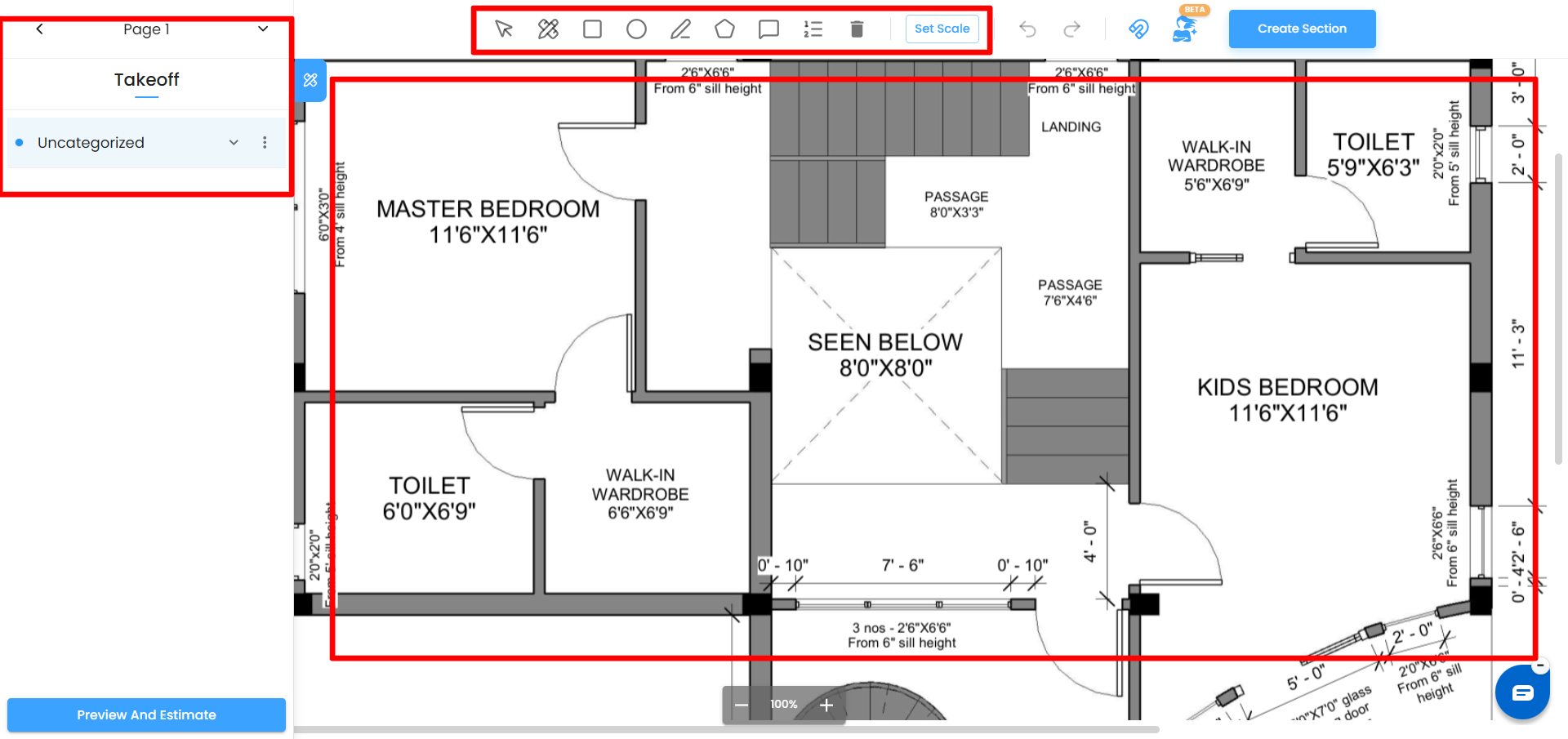
What You Will See

Back Navigation
The back arrow in the top-left corner takes you out of the current plan and returns you to the 2D Takeoff dashboard where all your plans are listed.
Page Selector
Next to the back arrow is a Page dropdown. If your uploaded PDF contains multiple pages or sheets, use this dropdown to switch between them. Each page maintains its own set of measurement items independently.
Upload PDF
You can add more pages to your plan at any time without starting over. Use the Upload PDF option on the canvas to attach additional PDF sheets to the current plan after it has already been created.
Set Scale
The Set Scale button is always visible in the toolbar. Click it at any time to calibrate or recalibrate the drawing scale. Setting the scale correctly is essential before drawing any measurements — see the Setting the Scale article for full instructions.
Snap Mode
Snap Mode makes aligning shapes to the edges of the 2D plan more intuitive. When you move a shape, it automatically snaps to the nearest edges of the plan, helping to align your shapes accurately. This feature simplifies the process of attaching shapes and ensures precision when placing objects.
Create Section
On the right side of the toolbar is a Create Section Button. Use this to create, and manage the sections that organize your measurement items. You can create new section and group items by floor, zone or any category that suits your project structure.
Ask Zyra — AI Button
The AI button - Ask Zyra lets you trigger IntoAEC's AI to automatically scan the plan, detect spaces and components, and generate measurement shapes for you. Instead of tracing rooms manually, Zyra identifies the areas from the drawing and creates the shapes — you review and confirm them.
Drawing Tools
The drawing tools sit in the center of the toolbar. Each tool creates a different type of measurement or annotation on the plan.
- Select and Move Switches you back to selection mode. Click any shape on the canvas to select it — handles appear around the shape allowing you to move it, resize it, or edit its edges. Always return to this tool when you have finished drawing and want to work with existing shapes.
Measure Measures the straight-line distance between two specific points on the plan. Use this when you need a precise point-to-point distance rather than a full area or length. - Square (Rectangle) Draws a rectangular measurement area. Click to set one corner, drag to the opposite corner, and release. Best suited for square or rectangular rooms and regular spaces.
Circle Draws a circular measurement area. Click to set the center point, drag outward to set the radius, and release. Use this for circular features, columns, or curved areas. - Line Draws a straight line to measure lengths — use this for wall lengths, pipe runs, cable routes, gutter lines, or any linear element on the plan.
- Polygon Draws a freeform shape by placing corner points one at a time. Click each corner of the area you want to measure and double-click to close the shape. Use this for irregular rooms, L-shaped spaces, or any area that does not fit a rectangle or circle.
- Add Annotation Places a text comment or note directly on the plan canvas at a specific location. Use annotations to flag queries, highlight scope boundaries, or leave instructions for other team members reviewing the plan.
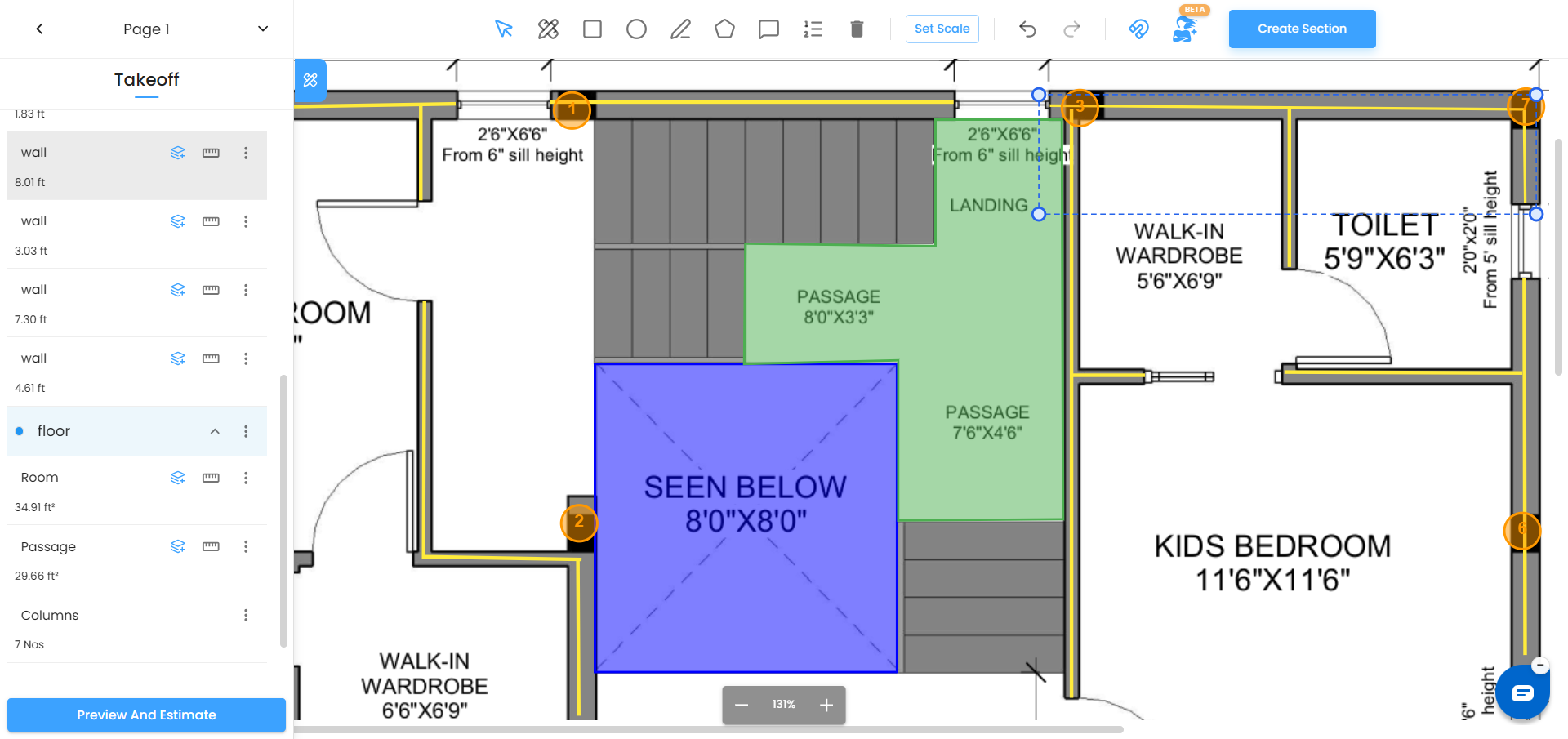
- Add Count Places individual point markers on repeating elements such as doors, windows, columns, light fittings, or any component you need to count. Each click places one marker, and the total count is tracked automatically in the Takeoff panel.
- Delete Shape Removes the currently selected shape from the canvas and from the Takeoff panel. Select a shape first using the Select and Move tool, then click Delete. This action is permanent — use Undo immediately if you delete something by mistake.
- Undo / Redo Undo reverses your last action. Redo reapplies it. You can click Undo multiple times to step back through a sequence of recent actions.
Zoom Controls
At the bottom center of the canvas, the current zoom level is displayed as a percentage — for example 50% or 80%. Use the minus (−) button to zoom out and the plus (+) button to zoom in.
- Zoom in to at least 80–100% when placing polygon points or setting scale reference points for maximum accuracy.
- Zoom out to 50% or lower to see the full plan layout when navigating between areas.
Moving Around the Plan
You do not need to zoom out to reach different parts of a large or zoomed-in plan. You can reposition the plan in two ways:
- Click and drag anywhere on the canvas to pan the plan freely in any direction. This pan mode works at any zoom level and is the quickest way to move across a large drawing.
- Arrow keys on your keyboard nudge the plan in small increments — up, down, left, or right — for precise repositioning when you need to align a view carefully.
Reshaping and Editing Shapes
Once a shape has been drawn — or detected automatically by Zyra — you can adjust it at any time.
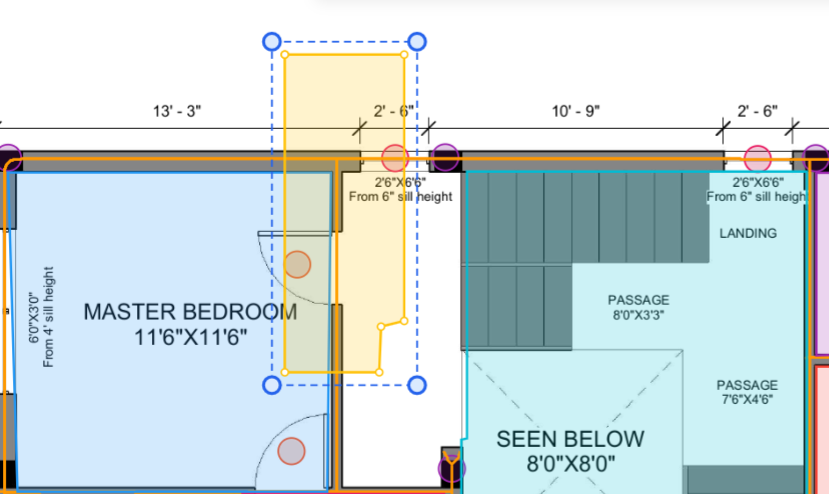
- Select any shape using the Select and Move tool. Handles appear around the edges and corners, letting you drag them to resize or reposition the shape.
- For more precise control over an irregular shape, double-click on any edge of the shape to add a new polygon point at that position. You can then drag that point to adjust exactly where the boundary sits, giving you fine-grained control over the area being measured.
- This is particularly useful for AI-detected shapes, where the automatic boundary may need slight adjustment to match the exact room edges shown on the plan.
Tips
- Always switch back to the Select and Move tool after finishing a drawing action. This prevents accidentally placing extra shapes when clicking around the canvas.
- Use Add Count for elements like doors and windows rather than trying to draw shapes over them — it is faster and gives you a clean element count for material purposes.
- Use Add Annotation to mark areas that still need measuring or that have open queries — it keeps all notes inside the plan rather than in a separate document.
Was this article helpful?
That’s Great!
Thank you for your feedback
Sorry! We couldn't be helpful
Thank you for your feedback
Feedback sent
We appreciate your effort and will try to fix the article