Once an estimate is accepted by the client, you can convert it into a Sales Order without manually entering the same information again.
When Can You Convert an Estimate?
An estimate can be converted to a Sales Order after it has been accepted by the client.
How to Convert an Estimate to Sales Order
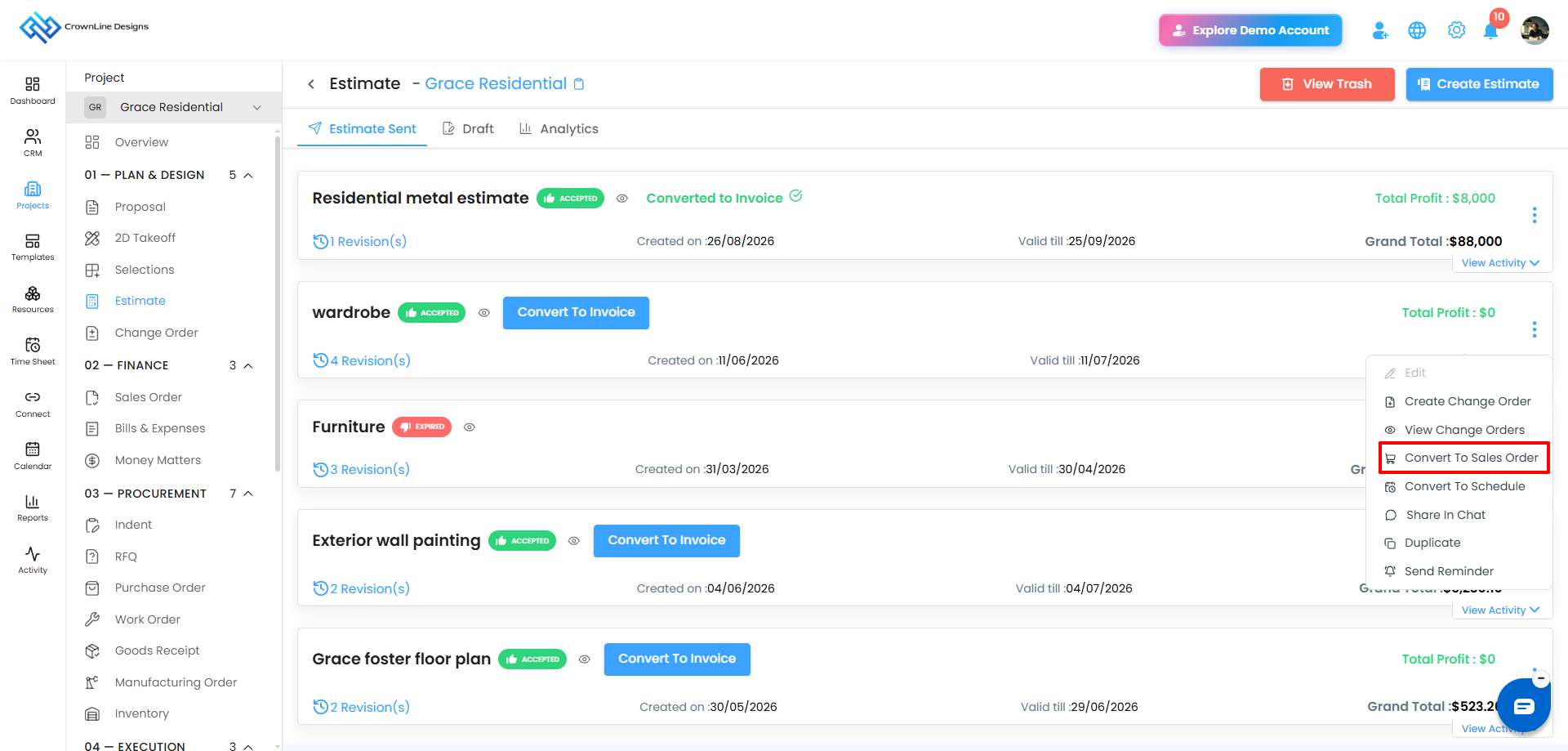
- Go to the required Project.
- Open the Estimate module.
- Locate the accepted estimate.
- Click the Kebab menu (⋮).
- Select Convert To Sales Order.
- The Sales Order will be created using the estimate details.
- The newly created Sales Order will be available in the Draft tab.
What Happens After Conversion?
- The Sales Order is automatically saved in Draft.
- It is marked with the Created from Estimate label.
- Since the Sales Order was generated from an estimate, its converted details cannot be edited from the Sales Order Draft.
- You can continue with the Sales Order workflow, such as sending it for approval or sending it to the client.
Pro tip: Converting an accepted estimate keeps the approved estimate information consistent and avoids duplicate data entry.
Was this article helpful?
That’s Great!
Thank you for your feedback
Sorry! We couldn't be helpful
Thank you for your feedback
Feedback sent
We appreciate your effort and will try to fix the article