The Sales Order feature helps you manage confirmed orders after an estimate is accepted by the client. It provides a clear record of the approved scope, pricing, and order details for project execution.
What is a Sales Order?
A Sales Order is a confirmed order that can be created from an accepted estimate or created manually.
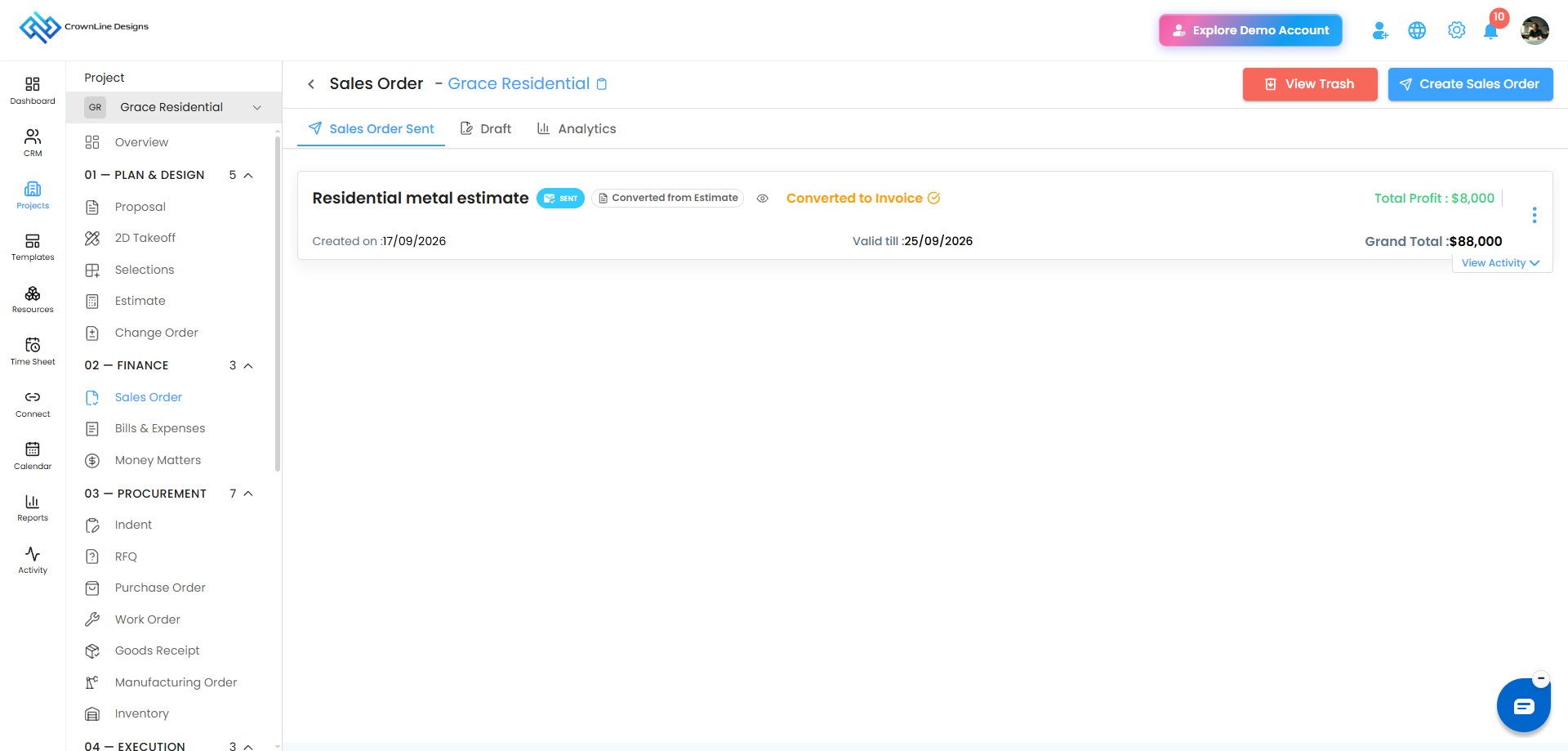
Sales Orders can be managed through different tabs based on their status and activity:
- Draft – Manage Sales Orders that are saved but not yet sent.
- Sent – View Sales Orders that have been sent to the client.
- Analytics – Track client interactions with sent Sales Orders.
A Sales Order created from an estimate is identified with a Created from Estimate label.
How Can You Create a Sales Order?
You can create a Sales Order in two ways:
- From an accepted Estimate – Convert an accepted estimate into a Sales Order.
- Manually – Create a Sales Order directly from the Sales Order module.
Pro tip: Use an accepted estimate to create a Sales Order when you want to carry the approved estimate details forward without entering them again.
Was this article helpful?
That’s Great!
Thank you for your feedback
Sorry! We couldn't be helpful
Thank you for your feedback
Feedback sent
We appreciate your effort and will try to fix the article