Lead Stage Customization – Manage Your Lead Pipeline
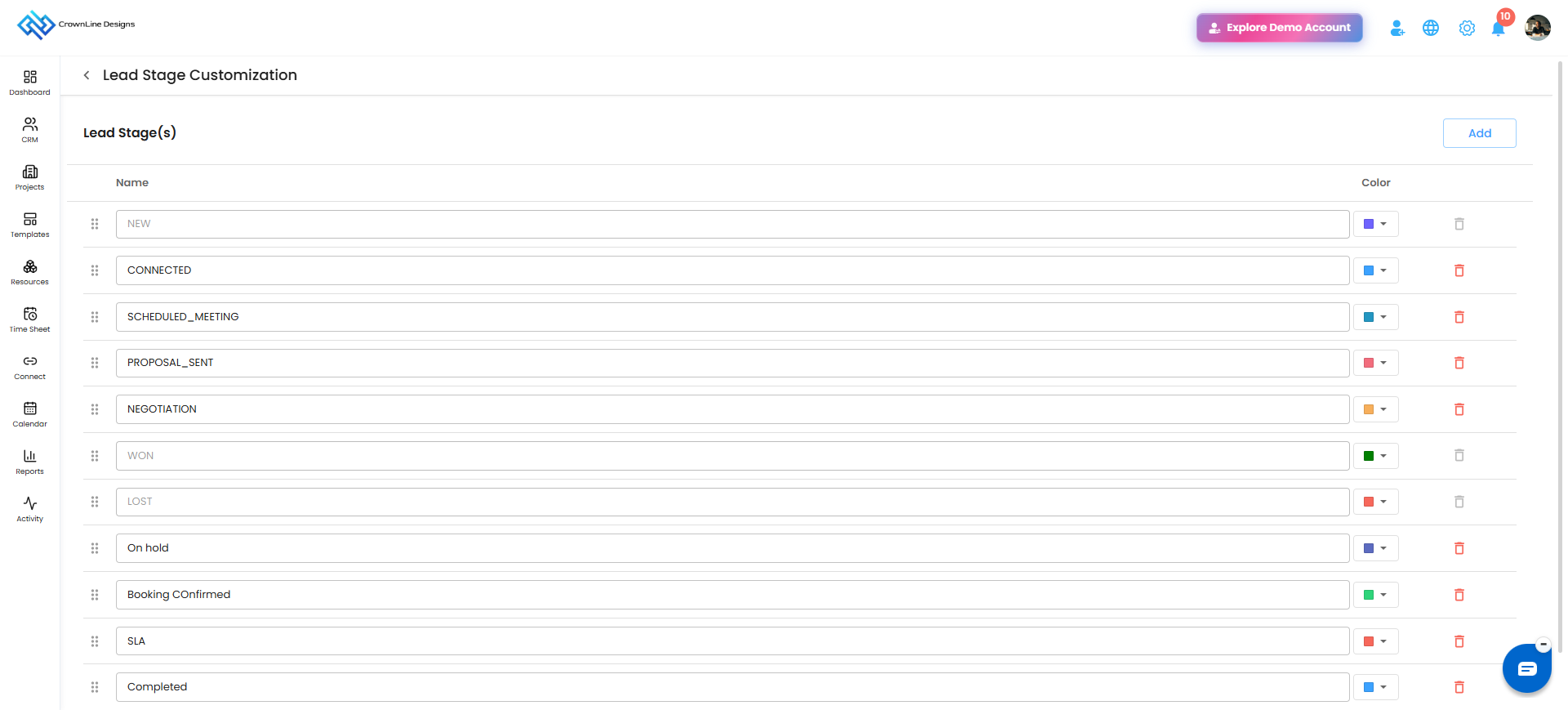
Lead Stage Customization helps you define and manage the stages through which leads move during the sales process. It provides a structured way to track lead progress and organize your CRM workflow.
Where to Find Lead Stage Customization – Quick Access
Navigate to Settings.
Select Preferences.
Under Project & CRM Preferences, click Lead Stage Customization.
What You Can Do Here
Add Lead Stages: Create new stages based on your sales workflow.
Reorder Stages: Arrange lead stages according to your preferred process.
Change Stage Colour: Assign colours to stages for easy identification.
Delete Stages: Remove stages that are no longer required.
Managing Leads Using Stages
Assign a stage to a lead based on its current progress.
The lead stage is displayed in the Lead Master grid.
The Kanban Board is organized according to lead stages.
Drag and drop leads between columns to move them to the preferred stage.
Pro tip: Keep your lead stages organized and meaningful to maintain a clear view of your sales pipeline.
Was this article helpful?
That’s Great!
Thank you for your feedback
Sorry! We couldn't be helpful
Thank you for your feedback
Feedback sent
We appreciate your effort and will try to fix the article